
Creating App Clients
Creating App Clients
An App Client is a non-human identity your backend uses to call Zus APIs. Unlike a user, an App Client authenticates with a clientId and clientSecret — no person needs to be in the loop.
This guide walks you through creating a machine-to-machine (M2M) App Client, exchanging its credentials for an access token, and making your first authenticated API call. Zus uses OAuth 2.0 under the hood; specifically, M2M App Clients use the Client Credentials flow.
Creating app clients in the Zus App
In the Zus App, go to Admin Settings → Developers. You must have the Builder Admin role in order to use this section.
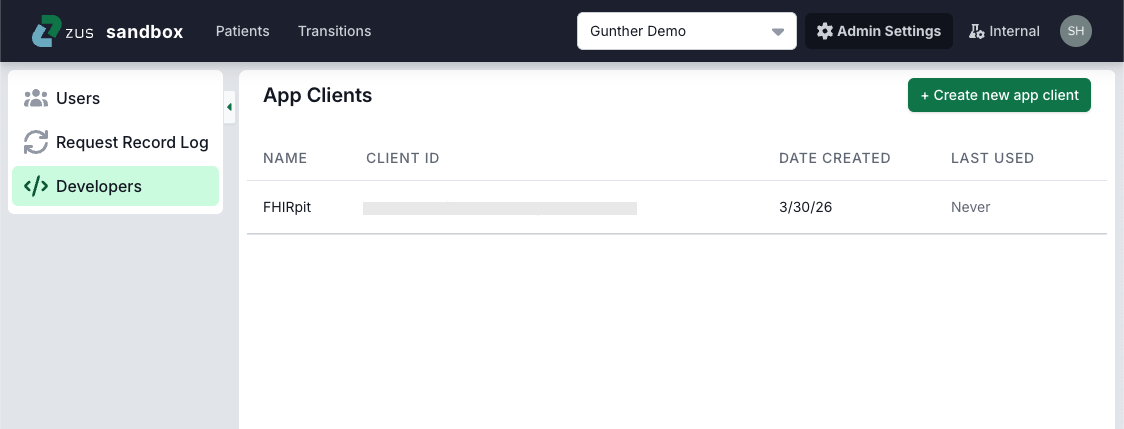
To create an app client, click the Create button in the upper right.
- Enter a descriptive name, e.g. "Demo Health encounters API integration"
- Choose the role that best describes your intended access (see table below for role options)
- Click Next. You will be shown the values for the client ID and client secret. Important: make sure to store the client secret right away, as you will only be able to view it once.
Creating app clients via API
As with the Zus App, you must have Builder Admin privileges to create app clients.
The full flow has four steps:
- Look up the role ID you want the App Client to have.
- Create the App Client and save its
clientIdandclientSecret. - Exchange those credentials for an access token.
- Call a Zus API with the token to confirm everything works.
Prefer to follow along in Postman?These steps are also available as the M2M App Client Creation Guide in the Auth & Permissions folder of the Zus Health API Postman collection.
Step 1: Look up the role ID
Every App Client is assigned exactly one role. The available roles are:
| Role | Description |
|---|---|
| Builder Admin | Recommended for most M2M App Clients. Full administrative access to your Builder Org. |
| Builder Data Integration | For App Clients that get access tokens on behalf of your users, such as EHR integrations or Zus apps embedded in your own UI. Includes everything in Builder Admin, plus access to the user proxy token endpoint. |
| Care Team User | Scoped access intended for clinical or operational users. |
Set the RoleName variable to your chosen role, then fetch its ID:
Request
GET https://api.sandbox.zusapi.com/auth/roles?filter[name]={{RoleName}}Response (abbreviated)
{
  "data": {
    "type": "auth/roles",
    "id": "<RoleID>",
    "attributes": {
      "name": "<RoleName>",
      "description": "<description>",
      "isManaged": true,
      "permissions": ["..."],
      "createdAt": 1638828368,
      "updatedAt": 1655996421
    }
  }
}
Copy the id value — you'll pass it as RoleID in Step 2.
Step 2: Create the App Client
This call creates the App Client and assigns the role from Step 1. See the Create App Client API reference for the full schema.
Request
POST https://api.sandbox.zusapi.com/auth/app-clients{
"data": {
"type": "auth/app-clients",
"attributes": {
"type": "machine_to_machine",
"name": "{{AppClientName}}",
"userType": "builder"
},
"relationships": {
"auth/roles": {
"data": {
"type": "auth/roles",
"id": "{{RoleID}}"
}
}
}
}
}
Save the response. The response body contains three values you'll need:
id— the App Client's UUID (used in Step 4).clientId— used as the OAuth client identifier in Step 3.clientSecret— used as the OAuth client secret in Step 3. Store this in a secrets manager; it cannot be retrieved later.Lost or compromised secret? Use the rotate-secret endpoint to generate a new one.
Step 3: Request an access token
Exchange the App Client's credentials for a Bearer access token using the OAuth 2.0 Client Credentials flow.
Parameters
| Parameter | Value |
|---|---|
grant_type | client_credentials |
client_id | The clientId from Step 2. |
client_secret | The clientSecret from Step 2. |
audience | https://api.sandbox.zusapi.com |
Request
curl --request POST \
  --url https://auth.sandbox.zusapi.com/oauth/token \
  --header 'content-type: application/json' \
  --data '{
    "client_id": "YOUR_APPCLIENT_ID",
    "client_secret": "YOUR_APPCLIENT_SECRET",
    "audience": "https://api.sandbox.zusapi.com",
    "grant_type": "client_credentials"
  }'
Response
HTTP/1.1 200 OK
Content-Type: application/json{
"access_token": "YOUR_APPCLIENT_ACCESS_TOKEN",
"expires_in": 3600,
"token_type": "Bearer"
}The token is valid for 1 hour (expires_in is in seconds). See Token expiry and rate limits below for guidance on refreshing.
Step 4: Verify the token works
Make a test API call using the token in the Authorization header. A good sanity check is to fetch the App Client you just created (substitute the id from Step 2 for <YOUR_APPCLIENT_UUID>):
Request
curl --request GET \
  --url https://api.sandbox.zusapi.com/auth/app-clients/<YOUR_APPCLIENT_UUID> \
  --header 'Accept: application/vnd.api+json' \
  --header 'Authorization: Bearer <YOUR_ACCESS_TOKEN>'
Response
{
  "data": {
    "type": "auth/app-clients",
    "id": "YOUR_APPCLIENT_UUID",
    "attributes": {
      "clientId": "YOUR_APPCLIENT_ID",
      "name": "YOUR_APPCLIENT_NAME",
      "type": "machine_to_machine",
      "userType": "builder",
      "createdAt": 1651254340,
      "updatedAt": 1651254340
    },
    "relationships": {
      "auth/roles": {
        "data": {
          "type": "auth/roles",
          "id": "ROLE_UUID"
        }
      }
    }
  }
}
A 200 OK confirms your App Client and token are working. You can now use the same Authorization: Bearer <token> header against any Zus API.
Token expiry and rate limits
- Tokens expire after 1 hour. When a token expires, repeat Step 3 to get a new one. Cache the token and reuse it until it expires — don't request a new one per API call.
- Token endpoint rate limit: If your application requests more than 200 tokens per hour for the same App Client, the token endpoint returns a
429 Too Many Requestserror. This limit is separate from the rate limits on Zus data APIs.
Updated 11 days ago