
Intelligent Refresh
The events that trigger Intelligent Refresh for enrolled patients and how soon refreshed data arrives.
Intelligent Refresh keeps enrolled patients' Zus Aggregated Profiles (ZAPs) current by looking for new records when clinical activity suggests there is something new to retrieve. It supports preparation for upcoming visits and visibility into care delivered elsewhere, without your team manually requesting each refresh.
It runs as part of an active Monitoring enrollment. The patient's package and enabled data sources determine which signals and refreshes apply.
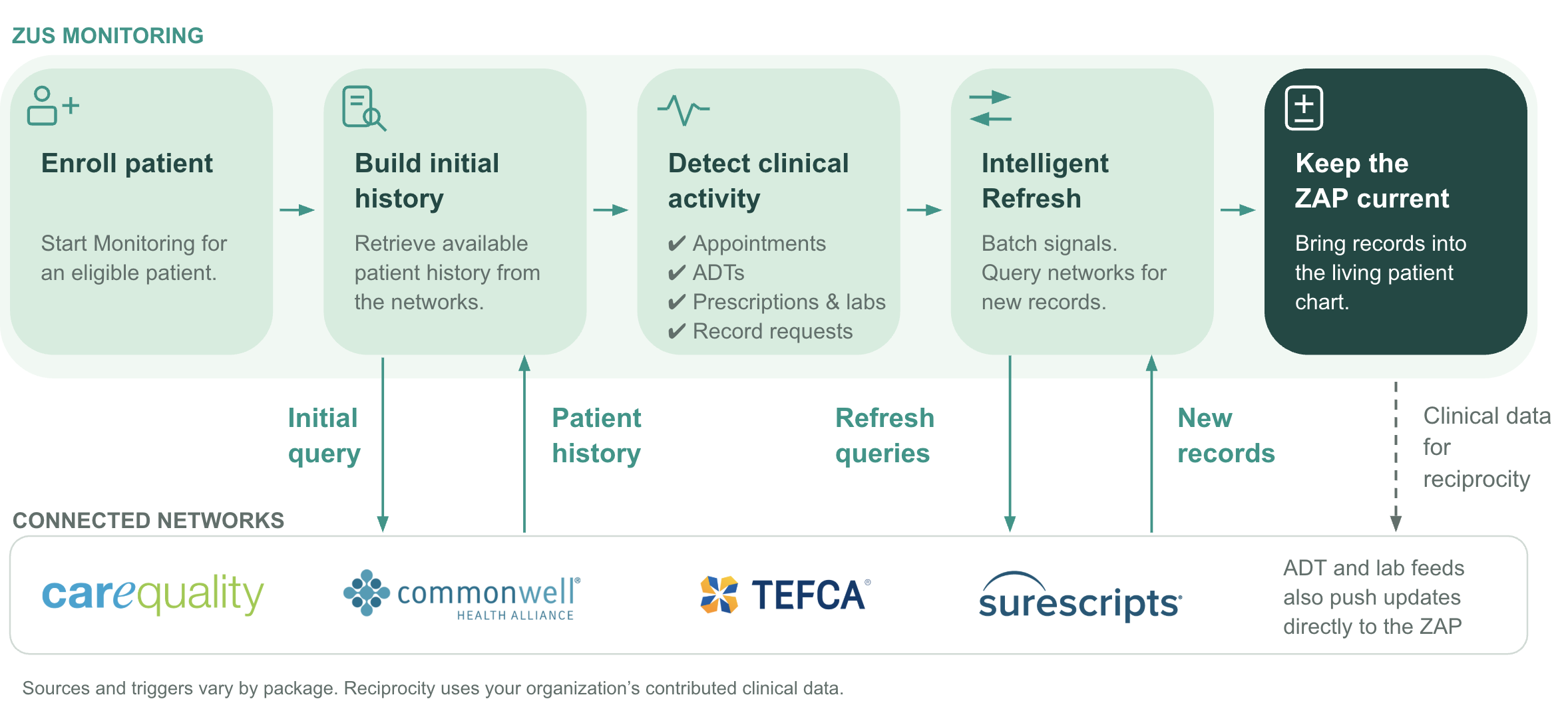
How Intelligent Refresh works
An initial history build populates the ZAP when you enroll a patient. After that, Intelligent Refresh uses clinical activity to decide when and where to look again.
- Detect a signal. An upcoming appointment, hospitalization notification, or other enabled signal indicates that new records may be relevant.
- Plan the query. Zus selects the relevant organizations, lookback, and timing based on the signal and the patient's configuration.
- Retrieve available data. Zus queries connected networks and updates the ZAP with the records returned.
Overlapping triggers can be batched into one network query. A signal does not necessarily create a separate query for every event.
Intelligent Refresh is event-driven. It does not query every enrolled patient on a fixed bulk schedule. Some signals lead to a later follow-up query because visit notes or discharge documentation may not be available immediately.
What can trigger a refresh?
The signals below describe how Intelligent Refresh can support different care workflows. Availability depends on the patient's Monitoring package, connected sources, and enabled functionality.
| Signal | Why it matters | How Zus responds |
|---|---|---|
| Your upcoming appointments | Your team needs current context before a visit. | Uses appointments written to Zus to schedule a pre-visit refresh, including appointments booked on short notice. |
| Appointments or visits at other organizations | New documentation may be available after outside care. | Schedules a follow-up refresh when outside appointment activity is detected. |
| Hospitalization notifications | An admission, transfer, or discharge may create new clinical records. | Uses ADT messages to refresh during a stay and follow up for discharge documentation. Requires enabled ADT coverage. |
| Inbound requests for records | Another organization's network activity can indicate the patient is receiving care elsewhere. | Uses that activity to inform targeted queries for new data. |
| New prescriptions | New medication activity may indicate a change in care. | Uses enabled pharmacy signals to look for updated records. |
| Lab activity | A new external result can indicate a recent encounter. | Uses enabled lab signals to prompt a refresh for related records. |
| Expected medication refills | An expected refill provides a useful time to check dispensing activity. | Refreshes pharmacy dispense data after the expected refill date for medications tied to supported quality measures. Requires medication adherence functionality. |
Zus determines refresh logic and may adjust it over time to improve data yield and freshness.
Queries and pushed updates work together
Intelligent Refresh retrieves records from networks that require a query. Enabled notification feeds, such as ADT and lab feeds, also push updates directly into Zus.
For example, an ADT discharge notification can tell your team that a patient left the hospital. A subsequent network query looks for the discharge summary. The notification may arrive before the summary is available, so follow-up queries help capture documentation as it becomes available.
Timing and data freshness
There are two useful ways to think about freshness:
- Visibility after care: How soon does evidence of an encounter appear in the ZAP?
- Readiness before a visit: Has Zus refreshed the chart before your patient's appointment?
A refresh request, a completed query, and newly available clinical documentation are different milestones. Even a completed query can return no new data if the source has not published it yet or cannot match the patient. Different sources may finish at different times.
Before your appointments
Write appointments to Zus with as much notice as possible so Intelligent Refresh can plan a pre-visit query. Appointments received on short notice can also trigger a refresh, but some sources may still be processing when the visit starts. Surescripts medication history can take up to 48 hours to populate.
During and after hospitalization
When ADT coverage and the corresponding triggers are enabled, Zus refreshes after hospitalization notifications and follows up during the stay. After discharge, Zus checks again for documentation that may arrive later, such as a discharge summary.
Refresh timing depends on the signal, enabled functionality, and data-source availability. Monitoring does not guarantee that every record is complete or that a particular encounter appears within a fixed period.
Set up your workflow
- Maintain active enrollment. Patients need an active Monitoring subscription for ongoing Intelligent Refresh.
- Share appointments early. Use an EHR integration or the FHIR API to write appointments to Zus. Include the start time and a supported status, and keep changes and cancellations current.
- Confirm coverage. Work with your Zus team to confirm which sources and triggers are enabled for your population.
- Review query activity. Use the Records Request Log in the Zus app to understand requests and source progress. A completed request does not establish that all external documentation is available.
For a patient who needs only a point-in-time history retrieval, request a Chart Build. A Chart Build alone does not enable ongoing Intelligent Refresh.
Updated 26 days ago